Suddenly unable to share New York Times articles to Push to Kindle—the window opens, but without any article name, and a preview never loads. If I send it to Kindle anyways, it ends up named “Push to Kindle article” and opens to the “unable to retrieve content” message. I have used this app to send to my Kindle Scribe for a few years now and nothing has changed on my end. please help!
Hello @LMO, welcome to the forum.
nytimes is always working to ‘improve’ their paywall, so third party software may have problems here.
What is your workflow?
- Desktop or Mobile browser?
- Using plugin, bookmarklet or pasting the URL to /get-started form?
- Are you a NYT subscriber
I have recognized, that the desktop browser plugin is setting default for ‘Use browser-retrieved content’ to OFF while this should be ACTIVE. So click on ‘Edit’ and check if this is activated:
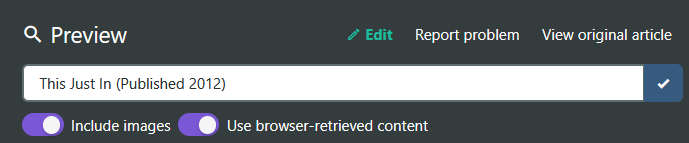
If you still have problems?: All articles or just some of them? If just some: URLs to articles please.
Hi, thanks for answering. I’m a NYTimes subscriber, and I was logged in to the Times app on my iPad. So I wasn’t using the browser extension, but choosing the Push to Kindle app after using the Times’ share button (I also tried their share a gift article option, meant to share with someone who doesn’t have a subscription, but that made no difference). It is still not working this morning—I have tried several articles. Here are a few: https://www.nytimes.com/2025/07/28/opinion/november-2026-democrats-midterms.html?smid=nytcore-ios-share&referringSource=articleShare
@LMO, can you remember roughly when the last time this worked from the NYT app? I would think this hasn’t worked for months.
P2K has two types of transmission. You just send the URL to P2K’s server and P2k server then tries to retrieve the content from the origin domain (nytimes). But because of NYT’s anti-bot mechanisms, this way no longer works. The second possibility is that an application sends the HTML code already received and interpreted by a browser as a whole to the P2K server.
The ShareSheet of the P2K mobile app can only use the first variant, so this no longer works. You would have to install the bookmarklet for Safari (does not work with Firefox@iOS).
Then you can send the link from the NYT app to Safari. You must also be logged in there to see the full content. Then you can click on the bookmarklet there.
If an error message appears in the P2K preview, tap on ‘Edit’ and activate ‘Use browser-retrieved content’. This should actually be standard, but is currently causing problems.
Thanks, I’ll try that.
This seems to be the last article I was able to send, from July 18th: https://www.nytimes.com/2025/07/18/opinion/ai-chatgpt-school.html?smid=nytcore-ios-share&referringSource=articleShare
Unfortunately, that did not work.
I was able to send the sample article in the directions, on global warming, just fine. But when I opened the NYT on Safari and chose Push to Kindle, I had the same problem again: no article name showed, no preview would load, and nothing to send to Kindle.
perhaps I am misunderstanding? I see you said send from the NYT app to Safari, but the only option I seem to have is to Google…
That is really awkward. I have thought there should be standard for sharing URLs to Safari. I do not have the NYT app but tested it here with a German magazine app and have the same problem.
Create a Share-Sheet via Shortcut-app. In my case I had to activate ‘text’ as input to work with my magazine app. It seems, that the app sends the URL as text instead as URL data type.
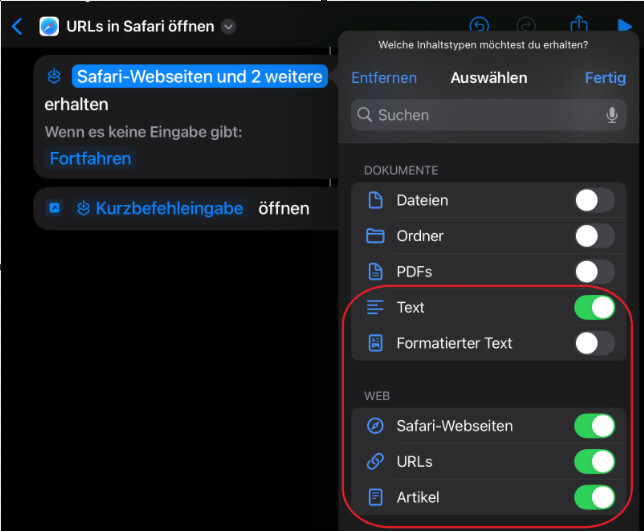
Not sure I’m getting what you did, especially in German. You created a shortcut, got that, but then you lost me.
- open Shortcut App
- open side menu and choose Share-Sheet, tap the
+button to create a new Shortcut. - rename the shortcut, e.g. ‘Open in Safari’
- In the first step of your ShortCut you already see something like ‘images and 18 more’. Tap this text to change it. Deactivate anything but ‘text’ and the 3 options in ‘Web’ (screenshot from last post)
- add a new action

‘open URL’ (or similar, it is German on my iPad) The i-hint should say, that a given URL will be opened in Safari. - Your shortcut is ready now.
- Now you have to install the bookmarklet in Safari. Sorry, I forgot to set the link last time.
Now open your NYT app and chose an article:
- tap ‘share’, or whatever it is called there
- look for your newly created Shortcut an tap it
- your article should now open in Safari. Maybe you have to log-in to NYT now.
- tap the bookmarklet in favorites, which should open the pushtokindle website in Safari.
- If the preview shows an error, tap ‘Edit’ and activate ‘Use browser-retrieved content’
- Now you should see the full preview and can send this to kindle.
I don’t know why, but the shortcut opens the article in the Nee York Times app instead of Safari!
Damn! But that spurred me on.
With another app, you can install additional actions and conditions to work around the new problem.
Install Actions from app store.
You need to add two steps between the existing steps in our ShortCut:
- We need to transform the input into a URL: Add (standard) action ‘Get URLs from’ to transform the text input into a data field of type URL
- add from your newly installed ‘Action’ app the ‘Open URLs in Safari’ action.
- You still need the standard ‘Open in Safari’ right after that.
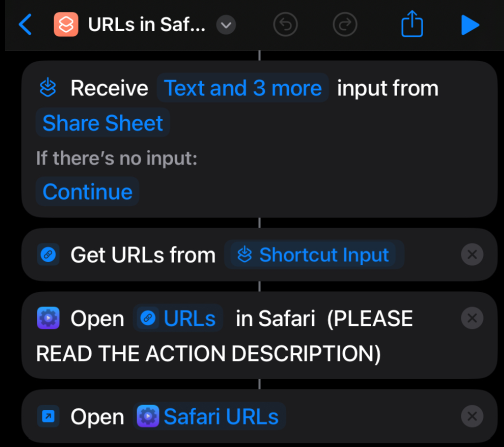
Here is a link to my ShortCut. After installing the ‘Actions’ app you can install it without putting it together yourself.
I installed the NYTimes app to test it. Now the links are opening in Safari.
@fivefilters When using the bookmarklet on iPad or the browser plugin on Firefox@Windows, articles from nytimes are opened with deactivated ‘Use browser-retrieved content’, while on other domains this option is already activated when using bookmarklet or desktop-plugin.
I had to always activate it my self with several tests on different articles.
Any reason or solution?
The article loaded in Preview (after I edited settings to “use browser-retrieved content “) but i got the message “Sorry, couldn’t send the article. Feel free to let us know if you’d like us to look into this.”
In this case, @fivefilters have to look into this. I could manage to send an NYC app articile to my kindle account.
Screenshots might be helpful here, @LMO . One before tapping ‘send’ (hide your mail-address!) and one with the error message. Along with the URL you used for the try.
Just catching up with everything in this thread.
It looks like the Push to Kindle servers are not getting responses from the New York Times when requesting content. We’ll have to look into this. We haven’t made any major changes, so I suspect something has changed on their side.
Regarding the different send mode @HolgerAusB wrote about, ie. browser-retrieved content, that only applies to our browser extensions. That mode essentially takes what’s loaded in your browser tab and sends it to Push to Kindle for processing, which means Push to Kindle does not have to make a request for the content. Mobile platforms do not give us that level of access, especially when the sharing occurs via apps like the New York times app. So we have to make a request via the server when we receive the URL. When using the Push to Kindle browser extensions, this is the same as toggling off the ‘use browser-retrieved content’ switch, which is on by default on most domains.
This is intentional, but now appears to be broken. The New York Times places the full content in JSON in their responses. We don’t send that JSON when using the browser-retrieved content - it’s treated as script content, so gets stripped. So we started disabling that option by default for New York Times articles so that the full content would get loaded. But it no longer works so we have to look into it to see what the solution should be.
Are you sure the article ever got to your Kindle? What I have found is that I can get it to say it sent the previewed article to my
Kindle address, but it never arrives, even a day later, nor does it show up in my Kindle content in my Amazon account—not even under “Pending.” I have triple-checked that my Kindle addressIf it’s sending the article, I don’t know where!
I tried with 2 articles and both arrived after about 5-10 minutes.
You are sure, you set your correct kindle-mail without the @kindle.com part on the P2K preview page? Weird!
We’ve made some changes to improve New York Times article processing. If you can, please try again @LMO
Problem solved with the NYT-App - thanks a lot for your great support!
2 Likes